
Set up ARK Ascended cluster transfers (Cluster ID + shared directory)
Clusters let characters / items transfer between maps that share the same cluster identity.
Minimum requirements
Section titled “Minimum requirements”| Requirement | Why |
|---|---|
| Same Cluster ID on every member | ASA cluster identity |
| Shared cluster directory all members can read/write | Transfer payload location |
| Unique ports per member | Each map is still its own dedicated process |
| Compatible mods | Transfers fail or corrupt when mods diverge badly |
In YARK, setting clusterId requires clusterDir on that profile.
When both are set, launch adds:
-clusterid=… -ClusterDirOverride=… -NoTransferFromFilteringClusters workspace
Section titled “Clusters workspace”The Clusters page shows compliance for Cluster ID / shared directory, and supports:
- Create cluster — assign a Cluster ID and shared folder to one or more stopped servers
- Add / remove membership on an existing cluster (stopped servers only; transfer files are not deleted)
- INI templates — edit Game.ini / GameUserSettings.ini for the cluster, then Promote, Restore, or Seed onto members (ports, passwords, and session stay profile-owned)
- Transfer / tribute — inspect expiration timers and upload slot caps across members, align cluster-wide values, and edit upload/download restrictions for one map
You can also join an existing fleet cluster when creating a server profile.
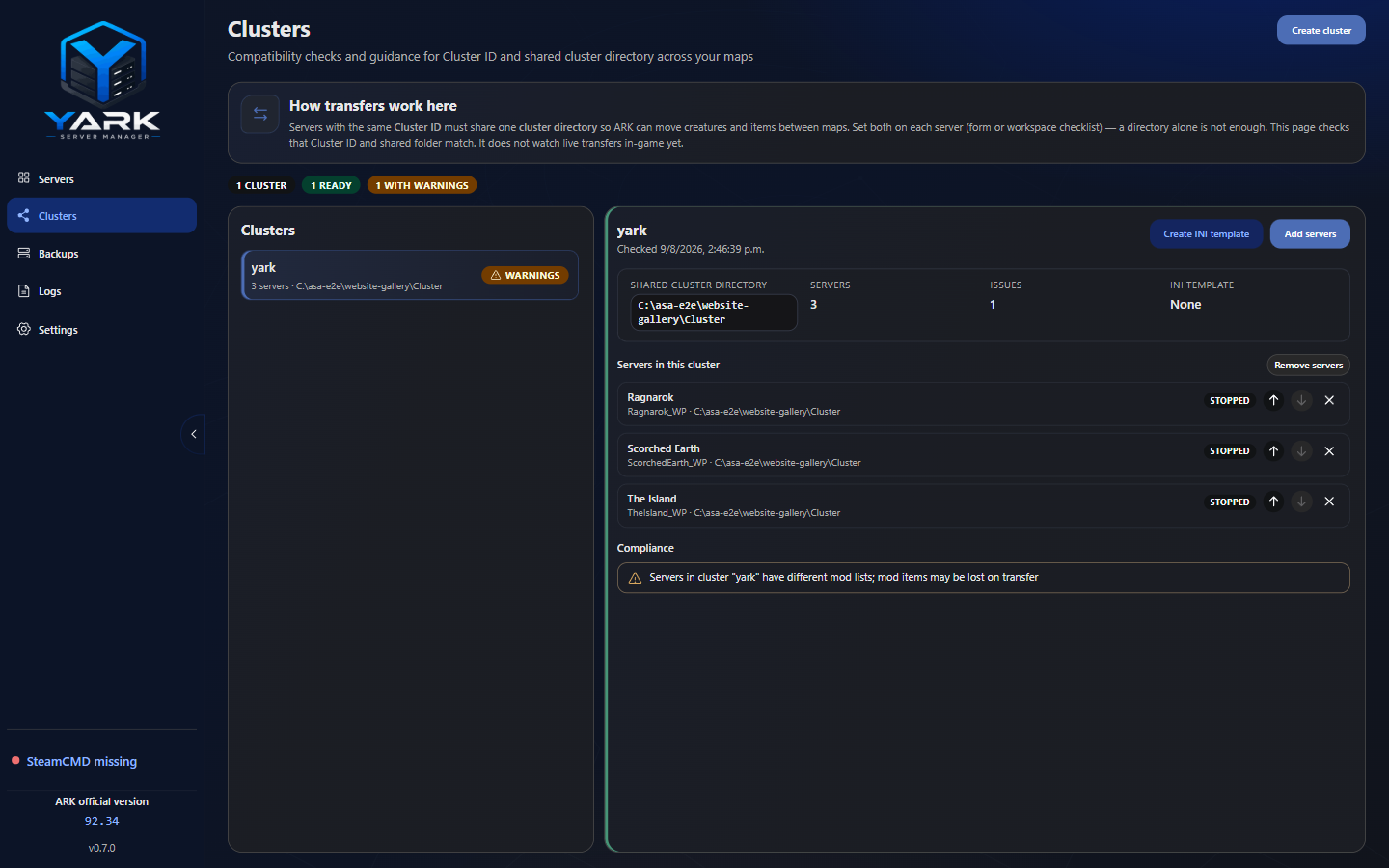
Clusters — create/membership, INI templates, and compliance for Cluster ID and shared directory.
Compliance is static profile math (IDs, directories, ports, mods) — it does not probe live transfers in-game. A two-map host checklist (upload, transfer both ways, restart, retrieve items) is in the engineering runbook for #22.
Transfer and tribute settings
Section titled “Transfer and tribute settings”Cluster-wide expiration timers and slot caps are read from
GameUserSettings.ini [ServerSettings]. YARK flags missing or mismatched
values. Mismatched expiration timers can delete ARK Data when a player opens
tribute on a map with a shorter timer. Expiration values are entered in seconds
and cannot exceed one year. Slot-cap descriptions follow the INI catalog; it
warns that increasing them may corrupt player or cluster data.
When applying cluster-wide values, YARK previews which stopped members will be
updated and which running members will be skipped. It patches only the six
cluster-wide keys onto each eligible member’s GameUserSettings.ini (same as
the row apply action), leaving other INI values unchanged. Save on Transfer
writes the cluster template. If that template is missing, or it only holds the
six tribute keys, YARK copies a member’s current GameUserSettings.ini first
and then writes those keys, so a later full Apply INI template does not wipe
the rest of the file. Full template restore remains available when you intend
to replace selected files from the cluster template.
Upload/download restrictions (PreventUpload*, PreventDownload*,
noTributeDownloads, and CrossARKAllowForeignDinoDownloads) are This map
only settings. They are not included in cluster drift checks or cluster-wide
applies and can only be saved for the selected stopped server.
Operator tips
Section titled “Operator tips”- Keep Cluster ID and directory aligned across members intentionally
- Prefer backups before wide INI or mod changes on a live cluster
- Document your shared directory path somewhere durable (disk letter changes break transfers)