
Validate ASA server profiles, install paths, and ports in YARK
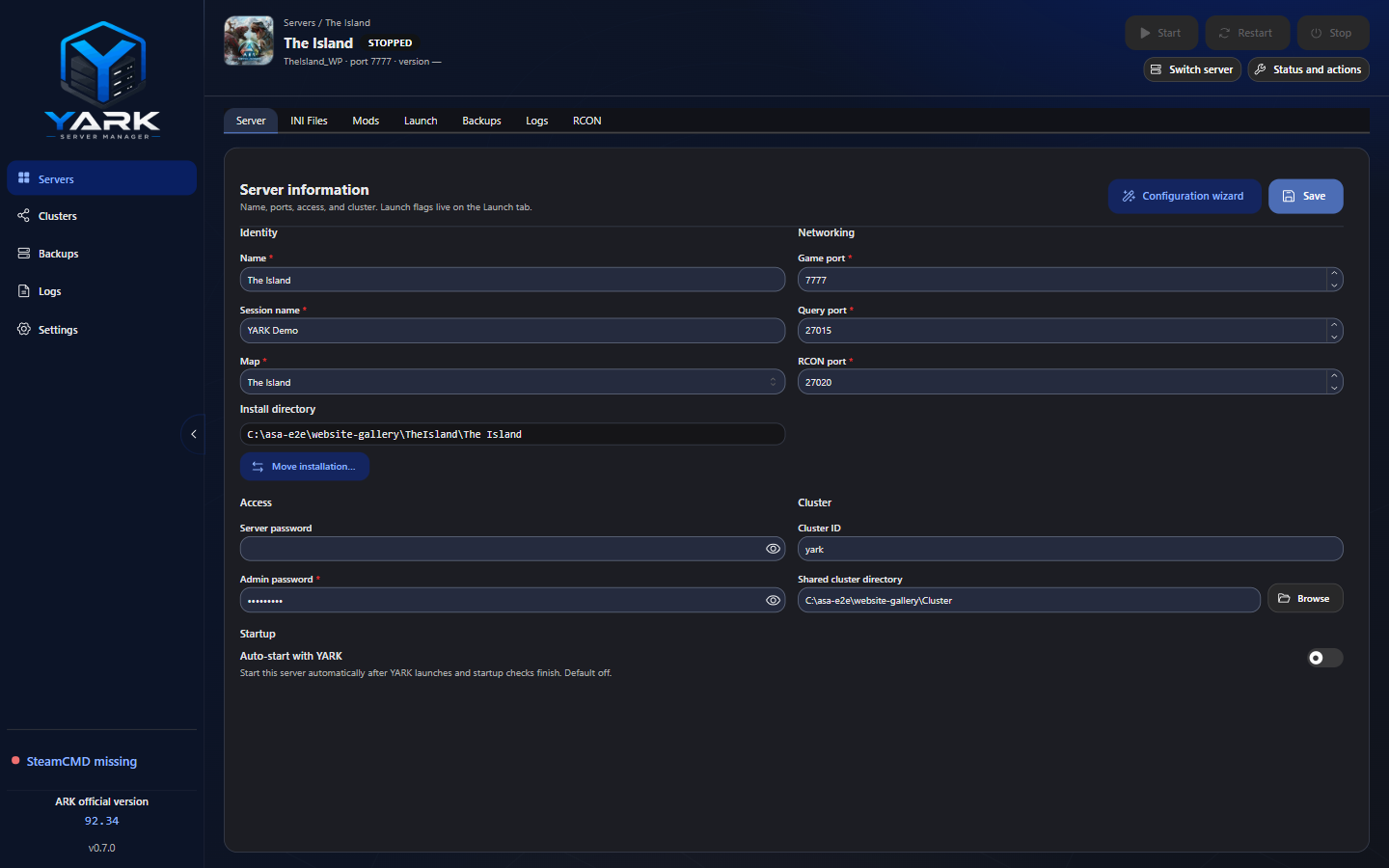
Each profile is one dedicated-server install YARK can manage: path, map, session, ports, passwords, mods, and optional cluster fields.
Required shape
Section titled “Required shape”| Field | Rule |
|---|---|
| Name | 1–64 characters (Windows folder-safe) |
| Map + session | Required. New server is official maps + Search Maps…; edit / import / clone may also use an enabled Map mod or Custom… |
| Max players | 0–255 on the Server form. Values 1–255 launch -WinLiveMaxPlayers. Empty or 0 omits the flag (ASA then defaults to 70). ASA ignores INI MaxPlayers. |
| Install dir | Absolute Windows path (C:\… or UNC) |
| Ports | 1024–65535; game, query, and RCON distinct inside the profile. Create/Clone suggest the next free fleet triplet from defaults 7777 / 27015 / 27020 |
| Admin password | Length ≥ 4 |
| Mods | Unique Project IDs (map packs must be enabled when using a custom map) |
| Cluster | If clusterId is set, clusterDir is required |
Map field
Section titled “Map field”Server Information → Map is an input-like control that opens a visual popover:
| Group | Use when |
|---|---|
| Official | Built-in ASA maps (thumbnails; e.g. The Island) |
| Map mods | Enabled CurseForge Maps packs whose launch token YARK could detect (edit / import / clone) |
| Search Maps… | CurseForge Maps card grid → details (screenshots + description) → confirm Map Name; sets map, links mapModId, and enables the Project ID |
| Custom… | You type the author launch token yourself (e.g. Svartalfheim_WP) — edit / import / clone escape hatch |
New server lists Official plus Search Maps… (no free-text Custom… on create). Choosing a
Map mod or finishing Search Maps… sets the launch token and links the pack’s Project ID.
Choosing a bare official map clears that link. Official-token remasters (packs that reuse a
KNOWN_MAPS token) keep mapModId and launch with -MapModID= before -mods= when the pack is
enabled. Custom… is for tokens YARK could not list — you still need the matching map pack
enabled on Mods for a correct boot.
Optional World save folder (when the on-disk SavedArks folder differs from the launch token)
persists for custom maps and remasters that carry mapModId.
Official maps use bundled artwork on cards, the workspace server list / Switch server panel, and the workspace header. Custom maps with a linked pack show that mod’s CurseForge logo when metadata has a thumbnail.
Clone keeps map + linked map-mod ID with the copied mods list. Copy configuration never copies map identity (including that link).
Share connection details
Section titled “Share connection details”Each time a server starts, YARK refreshes its public IPv4 and shows a copyable Join: open IP:port
command in the workspace header. Open Share connection details to view and copy the public IP,
session name, game port, query port, and join password (shown masked and copied only on demand). The
public IP is read-only; use refresh to check it again. ASA’s open command needs an IP address,
not a hostname. YARK ships no steam:// deep link, and copying connection details does not mean
the server is reachable: forwarding the game port (and the query port for the browser) on your router
and firewall is still up to you.
Port conflicts
Section titled “Port conflicts”YARK flags the same numeric port used by different profiles (any of game / query / RCON).
- Create / update profile — checked against all other profiles (live alerts on the create form)
- Start — checked against other active servers, then a host bind probe (UDP game/query, TCP RCON)
Create and Clone suggest the next free game / query / RCON triplet across your YARK fleet
(factory defaults 7777 / 27015 / 27020, then +10 steps that skip ports already used by other
profiles). There is no Settings range to configure.
If the host probe finds a port busy, start is blocked (edit ports or Start this session on a suggested free set). If the probe is inconclusive, you can also Start anyway — that override never applies when a port is confirmed busy. Session ports affect INI and launch for that run only; the saved profile stays unchanged.
Enable, disable, and clone
Section titled “Enable, disable, and clone”- Enable / Disable — Inactive profiles stay out of Start / Restart / auto-start. Enabling does not require installation health Ready; Start still does.
- Clone — duplicates profile fields with suggested free ports (same hunt as create) and copies Game.ini / GameUserSettings.ini from the source (new ports and session name overwrite identity keys). Copy entire server folder (off by default) also copies binaries, Saved, and world data when the source is stopped and has files on disk; it stays off for empty or unreadable installs. A failed folder copy removes the incomplete clone.
Cluster on create
Section titled “Cluster on create”When creating a server you can pick None or an existing fleet cluster (fills ID + shared directory). Create a cluster first from Clusters if none exist yet — see Clusters.
Hot edits while running
Section titled “Hot edits while running”You can edit many profile fields while a server is running. Ports and map take effect on the next restart. Profile settings that belong in INI (RCON, passwords, query port, session name, game port) are synced to GameUserSettings.ini on start (and opportunistically on update).
When that file and the Server form disagree on those identity fields, the Server tab names each changed field and shows the file value and the YARK value. Password rows name the field and hide both values. Use file values copies the file into YARK after a check that the ports do not clash with another server. Keep YARK values writes the profile back into the file. A missing admin password is refused. A missing join password clears that password. RCON stays on. The note does not block Start. Rates and other lines stay as they are.
Install path tips
Section titled “Install path tips”- Prefer a dedicated folder per profile under a fast disk
- Do not point two profiles at the same
installDir - Leave enough free space for Steam content cache + each install + backups