
Add CurseForge mods to an ASA dedicated server in YARK
What YARK does
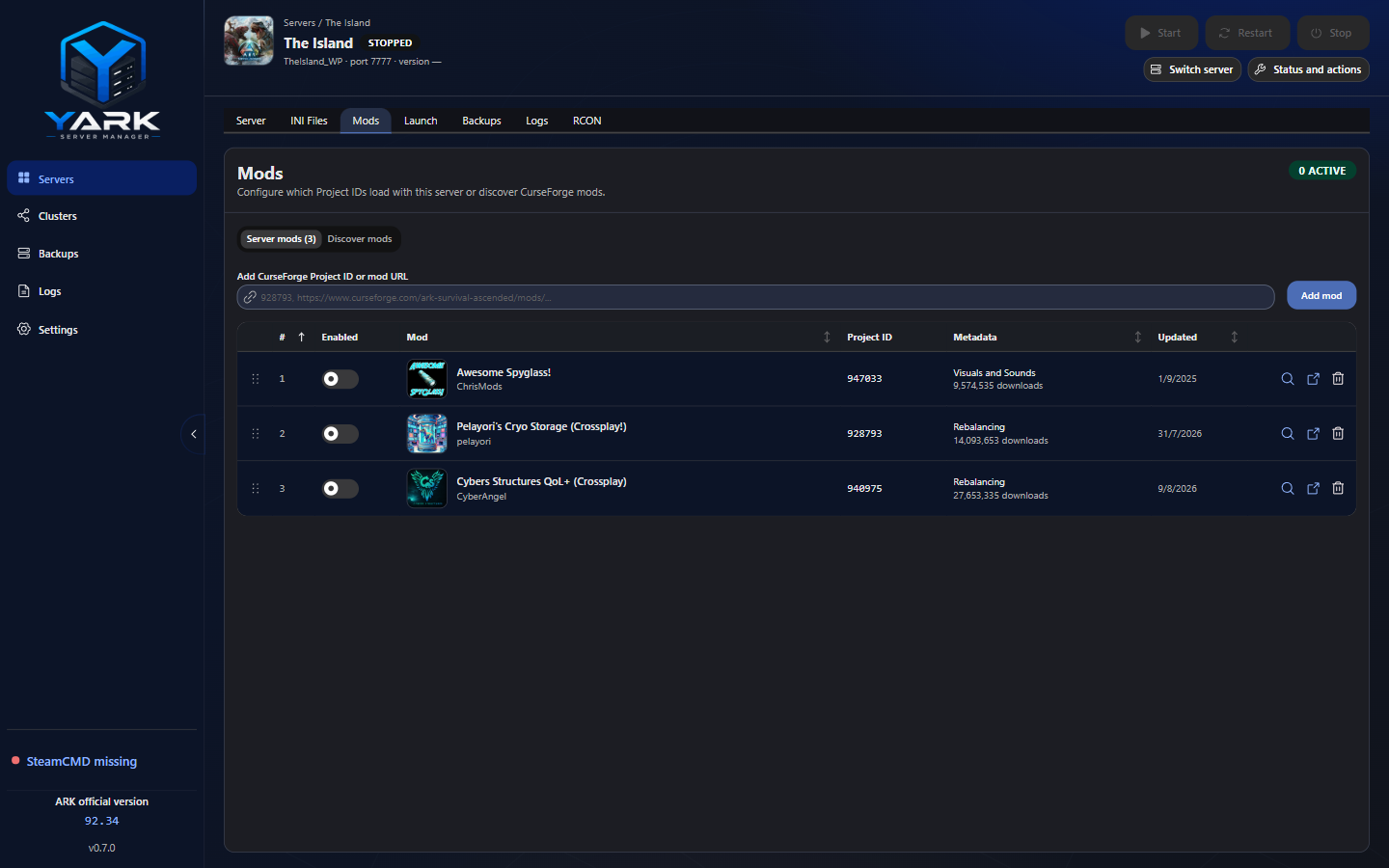
Section titled “What YARK does”The Workspace Mods tab stores CurseForge Project IDs per profile.
- Enabled IDs are passed at launch as
-mods=id1,id2,… - Disabled IDs stay on the profile until you turn them back on (no need to delete an ID to skip one boot)
- Passive IDs (row action, row menu, or detail drawer, on an enabled row) load their data with functionality disabled — for cluster transfer / “load data, no spawns”. They are sent only as
-passivemods=id1,id2,…, never on-mods=, and the row shows a Passive badge. Disable a passive row and the passive mark is cleared. - Newly added IDs start disabled — enable them explicitly before they appear on
-mods=. Add shows a Mod Added toast (two can stay visible; a third drops the oldest). Disabled inventory rows are dimmed (thumb + text) while the Enabled switch stays full strength; row Remove stays red subtle. One CurseForge category sits under the mod name (Maps uses attention color; extra tags as +N with a hover list). The detail drawer can enable, disable, and remove a configured ID, add a Discover result to this server, and shows a Maps launch-token hint (current map unchanged). - Discover browses CurseForge on open: category filter, in-field search (icon / Enter), pagination, and catalog sort from table headers (Name / Downloads / Updated), with Clear sort back to Popularity. The table scrolls in the panel with a fixed pagination footer. If the category list cannot load yet, Discover still works with a soft failure.
- Names / summaries / links come from a small Cloudflare Worker proxy and are cached locally
- The detail drawer can show a CurseForge screenshot carousel and a clamped plain-text description when inspect fetches get-by-id metadata
Maps / custom worlds
Section titled “Maps / custom worlds”CurseForge Maps packs are ordinary Project IDs on -mods=. ASA does not use legacy
ActiveMapMod. -MapModID= applies only to official-token remasters (see
Profiles & ports). A correct custom-map server needs both:
- The map pack Project ID enabled on this Mods tab, and
- The author launch token selected under Server Information → Map (see Profiles & ports)
Happy path
Section titled “Happy path”Fast path: New server → Map → Search Maps… → pick a CurseForge Maps card → confirm
Map Name. YARK sets the launch token, links mapModId, and enables the Project ID in one step.
From Mods (after create on an official map):
- Add the map pack Project ID (or URL) on Mods — it starts disabled
- Enable it — YARK shows a toast that the mod is available under Map; your current map is not changed
- Open the Server tab → Map → pick the pack under Map mods, use Search Maps…, or Custom… if you must type the token yourself
- Check Launch preview, then Start
Enabling a Maps mod never overwrites the map you already have. You choose when to switch.
If YARK can read a Map Name: / Server Name: / *_WP token from CurseForge metadata, the pack
appears under Map mods (the detail drawer also shows that token). Operator copy does not
assume CurseForge always lists the name — check the map community, wiki, or author notes when it
does not. If inference fails, use Custom… with the token from the author page, and keep the
map pack enabled on Mods.
What YARK does not do
Section titled “What YARK does not do”Operator tips
Section titled “Operator tips”- Wrong Project IDs still get wired into launch if enabled — verify IDs on CurseForge
- Restart after changing the enabled set so the new
-mods=list applies - Back up the world before enabling mods a world already depends on (or before removing them)
- Cluster members that transfer together usually need compatible mod sets
- For map packs, confirm both enabled on Mods and the correct Map token before Start — a
passive map pack is omitted from
-mods=, so Mods shows a warning until you mark it active again - Row actions and right-click menus share the same Menu chrome as the icon buttons — use either path
Discover is the supported CurseForge browse surface on this tab (beyond typing Project IDs or URLs).